
A fast, native code editor
for macOS.
Written in Rust and drawn on the GPU. It opens a 100 MB file in about 0.2 s, puts a keystroke on screen in about 4 ms, and brings your keys and settings over from VS Code, Cursor, Zed, JetBrains or Sublime Text.

01 · islands
Islands, and one popup for everything
The file tree, the editors, the terminal and the tools sit in rounded panels around your code. ⌘P, ⇧⌘P and ⇧⌘F open one popup that goes to files, symbols, lines, actions and text.

02 · vs code at heart
Your keys and settings come along
VS Code's keymap and command ids, settings.json and keymap.json in its format, when clauses, per-language and per-project settings. On first launch Glint offers to bring your keys and settings over from VS Code, Cursor, Zed, JetBrains IDEs or Sublime Text, and shows what maps before anything changes.
// ~/.config/glint/settings.json
{
  "editor.fontSize": 14,
  "editor.formatOnSave": true,
  "[rust]": { "editor.tabSize": 4 },
  "workbench.colorTheme": "Nova Violet Dark"
}

03 · agent
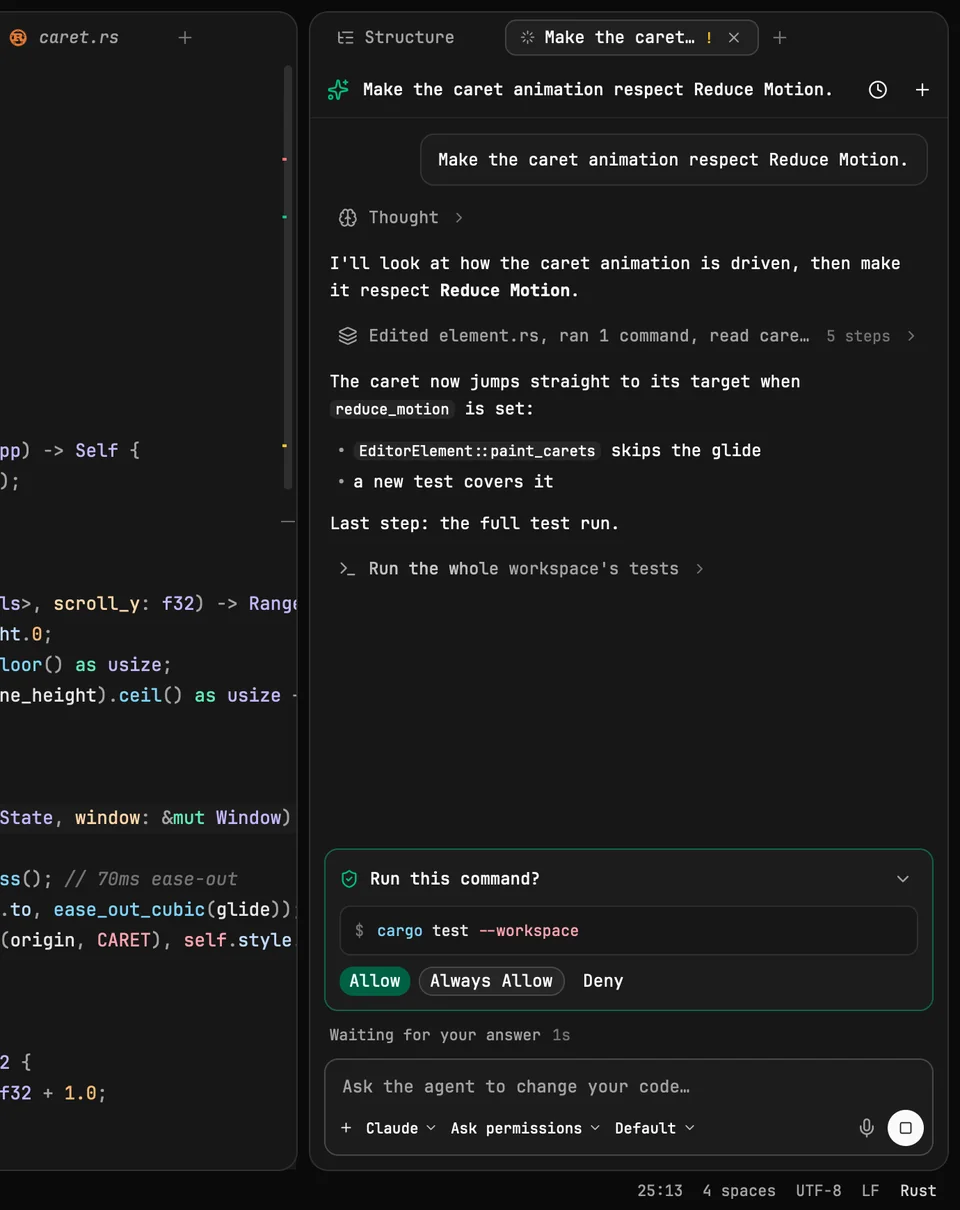
An agent in a tab
⌘L opens a chat with Claude Code or OpenAI Codex. Glint runs the CLI you already have, signed in with your own subscription.
- Edits, commands and tool calls fold into steps you can read.
- Permission requests are answered right in the chat.
- Drop files, folders and pictures in; chats come back after a restart.
04 · git
Git without leaving the editor
Stage, commit, branch, stash, pull and push through the git you have. Diffs show inline or side by side, and the right side edits the file.

05 · themes
Your colors
Every Tailwind accent on five base grays, or any shadcn theme saved as CSS. ⌘K ⌘T previews each one as you move through the list. The whole interface is set in JetBrains Mono.

06 · updates
It updates itself
Glint finds a new version, checks its signature and installs it in the background. One click restarts into it, with your windows where they were.

07 · status
Early, and honest about it
- macOS only: 11 or later, Apple Silicon and Intel.
- No language servers yet: no completion, go-to-definition or diagnostics beyond syntax.
- English only: the interface has no other language yet.
- Not notarized by Apple yet: the first launch takes one extra step, below.
08 · install
First launch
Glint is not notarized by Apple yet, so macOS asks once before it opens.
- Open
Glint-0.1.1.dmgand drag Glint to Applications. - Open Glint. macOS says it cannot check it: close the message with Done (not Move to Trash).
- Open System Settings → Privacy & Security. Below “Glint was blocked”, choose Open Anyway and confirm.
Or, in Terminal, once:
$ xattr -dr com.apple.quarantine /Applications/Glint.app
To check the download first:
$ shasum -a 256 ~/Downloads/Glint-0.1.1.dmg
dbc8cad126ab408f95c3ca6927e2c1ae583fb43fff5a0beedadd5c660da9d1a2
After that Glint updates itself, and every update is checked against its signature before it is installed.